Fetch and Pull
PROBLEM SITUATION
- Your commit history is lagging behind the remote repository, as you can see in the figure below:
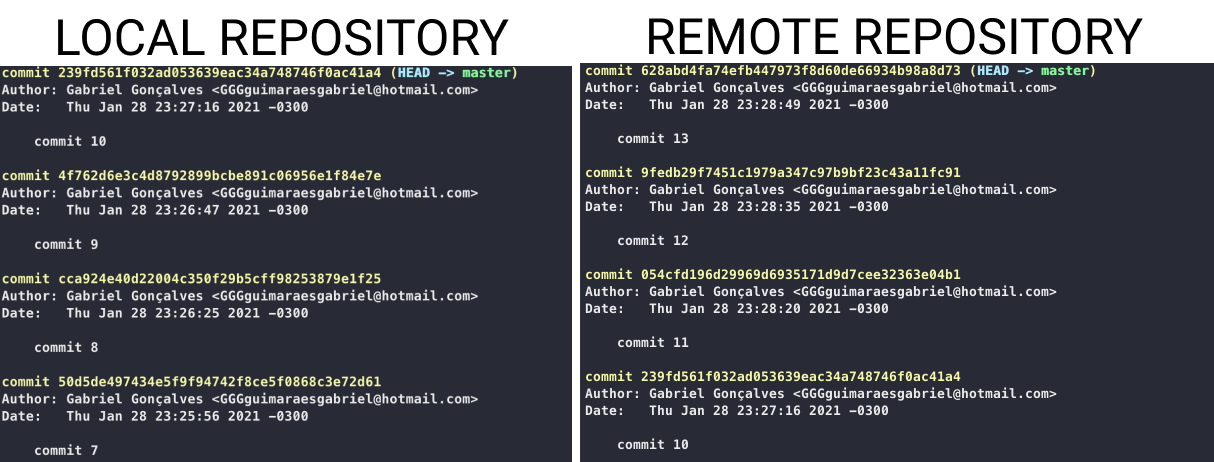
- This is a common situation that you may suffer, which is bad, because the later you are, the more new things your project has and you are not part of the updates.
DIFFERENCE BETWEEN GIT PULL AND GIT FETCH
GIT PULL:
- Updates your local repository, leaving it the same as the remote repository. But when the pull the git happens, it joins the code of the remote environment with that of the local, for example, you are late in the project, because you were performing a feature, but you did not want to wait to finish and made a git pull, so git will act to merge the local and remote repository.
GIT FETCH:
- Does the same pull, but it does not merge, it does not join the codes, git downloads the remote repository, but does not join, to join the codes, do the command: git merge.
APPLICATION:
$ git pull origin master
$ git fetch origin master