Serious problems
PROBLEM SITUATION:
If you have done something very serious, that can hinder the project, you can solve with two commands:
- git reflog
- git cherry-pick
WHAT IS GIT REFLOG:
- This command takes all the history of actions you've done in your repository, if you've reset, rebase, commit. Everything is recorded, git doesn't want to lose information you do, which is why git is very powerful.
WHAT SHOULD I DO NEXT:
Let's assume you deleted your remote repository, what now?
- Makes git reflog to catch the hash.
- Makes the git cherry-pick "hash you picked up in the reflog".
Ready!! but after you do this, it may be that the git, ask you to commit again, or another command, READ the GIT COMMAND, but the important thing is that with the reflog you can fix your error.
PRACTICE:
- I had all my commit on remote and local, but I did a beast that deleted all my local and remote history:
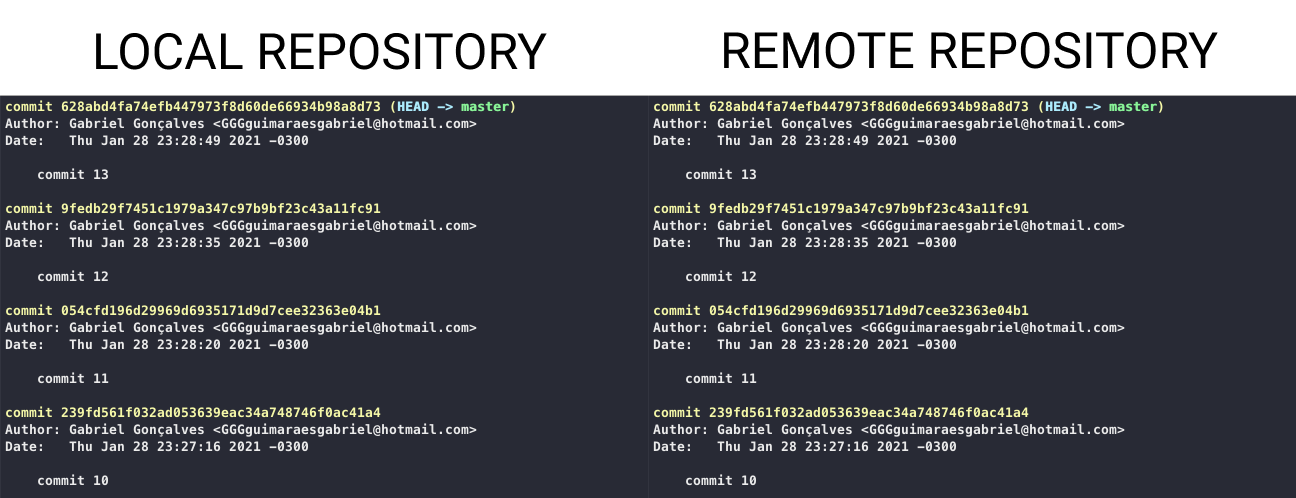
Now we did a stupid thing, unintentionally went back to first commit, and without realizing I sent to the remote repository!

HOW TO RESOLVE?
$ git reflog

3218596 (HEAD -> master, origin/master) HEAD@{0}: reset: moving to 321859681d76308922564cc063a5ab8e2b93946f
8b28b77 HEAD@{1}: cherry-pick: commit eleven
C8D535e HEAD@{2}: Reset: Moving to FETCH_HEAD~1
d895553 HEAD@{3}: commit (cherry-pick): commit eleven
C8D535e HEAD@{4}: Reset: Moving to FETCH_HEAD~1
2123492 HEAD@{5}: pull: Fast-forward
Note: This command will show all action history, you can see that the first of the list I did a reset --hard, for the first commit.
- Now we take the HASH where we want to go back, let's go back to the latest:
$ git cherry-pick 8b28b77
Note: git will show an error, maybe git ask to resolve conflict, commit again, "git commit --allow-empty", or maybe just need:
$ git cherry-pick --continue
and ready!, but the git take only the informations, he does not take all the commits, let's see how it turned out:
commit 4b4fbc12f6781e355d68f87704a28dfd2d3ae0b4 (HEAD -> master)
Date: Thu Jan 28 23:28:49 2021 -0300

commit 13

commit 321859681d76308922564cc063a5ab8e2b93946f
Date: Thu Jan 28 23:26:25 2021 -0300

commit 1
Notes:
- For you to re-pick each commit, you would have to do it one by one, and thus form the history again.
- I guarantee you will never want to use this command again, because if not something very serious has happened. Only use this command out of extreme necessity.